

🖥️ WP Frontend Admin – Create Frontend Dashboards for WordPress
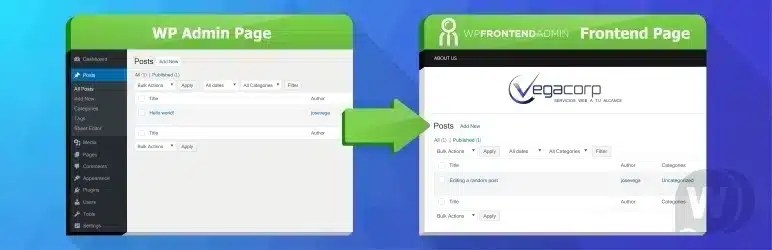
WP Frontend Admin – Create Frontend Dashboards for WordPress is a premium WordPress plugin that allows website owners to build powerful frontend dashboards where users can manage website content, WooCommerce data, user accounts, forms, and administrative tasks without accessing the default WordPress admin area. It is designed for membership websites, WooCommerce stores, client portals, marketplaces, educational platforms, SaaS applications, agencies, intranets, and community websites that require secure frontend management.
One of the standout features of WP Frontend Admin is its ability to transform WordPress administration into a user-friendly frontend experience. Using shortcodes and visual configuration options, administrators can create custom dashboards that allow users to edit posts, pages, products, custom post types, media files, user profiles, forms, comments, and other WordPress content directly from the website frontend. Role-based permissions help control which features and content each user can access.
The plugin integrates seamlessly with WordPress and supports integration with WooCommerce, enabling store managers and vendors to manage products, orders, coupons, and customer information without using the standard WordPress dashboard. It is also compatible with many popular plugins and custom post types, making it suitable for a wide range of workflows.
Users can build frontend systems for:
- WooCommerce stores
- Membership websites
- Client portals
- Vendor dashboards
- Learning platforms
- Community websites
- Business intranets
- Agency client portals
- Marketplace websites
- Content management portals
The plugin is optimized for responsive performance, ensuring dashboards work smoothly on desktops, tablets, and smartphones. Features commonly include frontend content editing, media management, user profile editing, role-based permissions, custom dashboard layouts, and secure access controls, helping organizations simplify workflows while reducing the need to expose the WordPress admin panel.
Additional features often include:
- Frontend dashboard builder
- Frontend post and page editing
- WooCommerce management
- User profile management
- Media library access
- Role-based permissions
- Custom post type support
- Responsive dashboard layouts
- Shortcode integration
- Performance-optimized architecture
🔑 Key Features
- Custom frontend dashboards
- Frontend content management
- WooCommerce integration
- User profile editing
- Media management
- Role-based access control
- Custom post type support
- Responsive mobile-friendly interface
- Shortcode-based implementation
- Performance-optimized design
🎯 Best For
- WooCommerce stores
- Membership websites
- Client portals
- Marketplace platforms
- Educational websites
- Agencies
- SaaS platforms
- Community websites
⚠️ Important Reality
👉 Frontend dashboards can significantly improve user experience, but security depends on proper permission configuration. Always assign the minimum required capabilities for each user role and test access controls before deploying them on a live website.
👉 Review role permissions carefully to prevent unauthorized users from editing, deleting, or accessing sensitive information.
👉 If your dashboard handles personal or financial data, use HTTPS, strong authentication, regular backups, and appropriate security plugins to protect user information.
👉 Regularly update WordPress, themes, plugins, and custom integrations to maintain compatibility, security, and reliable performance.
Many successful WordPress businesses combine frontend dashboards with membership systems, WooCommerce, custom workflows, analytics, and automation tools to deliver a streamlined and secure user experience.
✅ Final Verdict
WP Frontend Admin – Create Frontend Dashboards for WordPress is an excellent solution for businesses and developers who want to provide a secure, user-friendly frontend management experience. With custom dashboards, WooCommerce support, role-based permissions, responsive layouts, and flexible content management capabilities, it offers a powerful way to simplify WordPress administration while keeping users out of the traditional backend.